What players say
Quick Arithmetic is a straightforward math puzzle that keeps you engaged. The simple right or wrong mechanic is easy to understand but challenging to master. It offers good replayability as you try to beat your own score. The game runs smoothly on any device and is perfect for a quick mental workout. It is a solid choice for families and students alike.
About this game
Game Introduction
Quick Arithmetic is an engaging math game that challenges your calculation speed and accuracy. In this game, you are presented with simple arithmetic sums, and your task is to quickly decide if the answer is correct or not. It is a perfect way to sharpen your mental math skills while having fun. Whether you are a student looking to practice or an adult wanting to keep your mind sharp, Quick Arithmetic offers a delightful and educational experience. The game is designed for all ages, making it a family-friendly choice. With its straightforward gameplay, you can jump right in and start testing your abilities. Plus, it runs smoothly on both mobile and desktop devices, so you can play anytime, anywhere.
How to Play
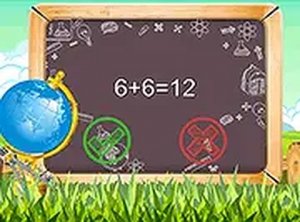
Playing Quick Arithmetic is simple and intuitive. When the game starts, you will see a math sum displayed on the screen, such as '3 + 5 = 8'. Your job is to click either the 'Right' or 'Wrong' button based on whether the sum is correct. Each correct answer earns you points, and the game keeps track of your score. The key is to respond quickly and accurately, as the game moves at a steady pace. There are no complicated rules or controls, making it easy for anyone to pick up and play. You can also play in full screen mode for a more immersive experience. Just use your mouse or touch screen to make your choices, and enjoy the challenge of beating your own high score.
Game Features
Quick, brain-training math gameplay. Simple right or wrong answer format. Score tracking to monitor progress. Full screen mode for focused play. Works on mobile and desktop devices. Free to play with no downloads needed.
Tips for Success
To improve your performance in Quick Arithmetic, practice regularly to increase your speed and accuracy. Focus on each sum carefully before responding, as rushing can lead to mistakes. Use the score tracking to set personal goals and challenge yourself to beat your previous records. Taking short breaks between sessions can help maintain concentration. Since the game is suitable for all ages, it can be a fun family activity to practice math together.